Create Appointments
Schedule one-time or recurring therapy sessions for yourself or team members.
2 min Updated December 16, 2025
Add an Appointment
Tap Add Appointment to open the form.
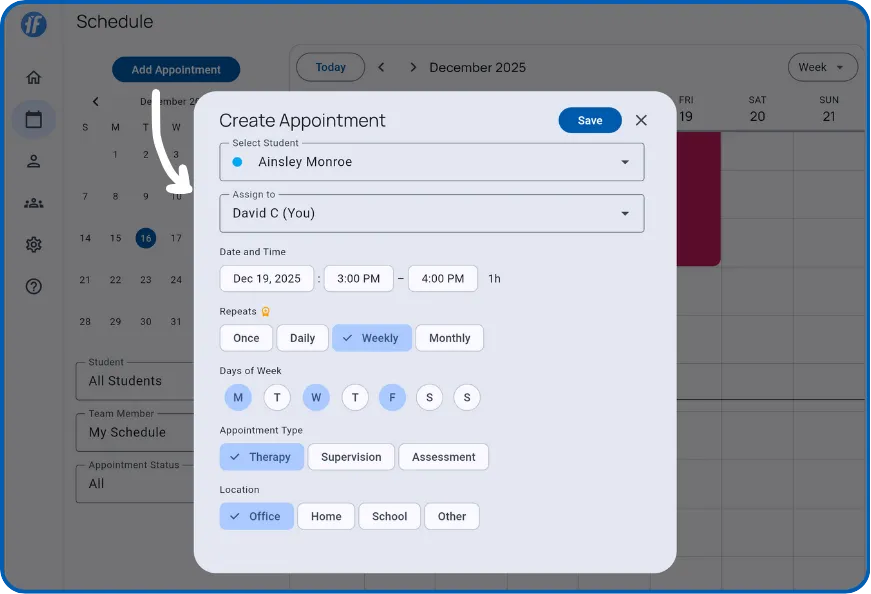
Fill in:
- Student - Who the appointment is for
- Assign To - Yourself or a team member (Teams plan)
- Date & Time - Duration calculates automatically
Recurring Appointments
| Pattern | Description |
|---|---|
| Once | Single appointment |
| Daily | Every day |
| Weekly | Same day each week |
| Monthly | Same date each month |
Recurring requires Solo or Teams plan.
Type & Location
Type: Therapy, Supervision, or Assessment
Location: Office, Home, School, or Other
Save
Tap Save. The appointment appears on your calendar immediately.
If the visit already took place, document the past appointment to add observations, including data you recorded before creating the appointment.
What’s Next?
- Manage Appointments - View details, start sessions, edit or cancel
- Navigate Your Calendar - Switch views and find dates
Need Help?
Questions about creating appointments? Email support@tallyflex.com.